For the modern hobbyist, the world of digital fabrication has evolved from a niche industrial pursuit into a vibrant, living-room-friendly ecosystem. What began as a mild curiosity with simple vinyl stickers has, for many, blossomed into a full-blown obsession. Whether it’s sourcing thrifted blanks for custom apparel or experimenting with intricate patchwork appliqué, smart cutting machines have become the beating heart of the contemporary craft room.
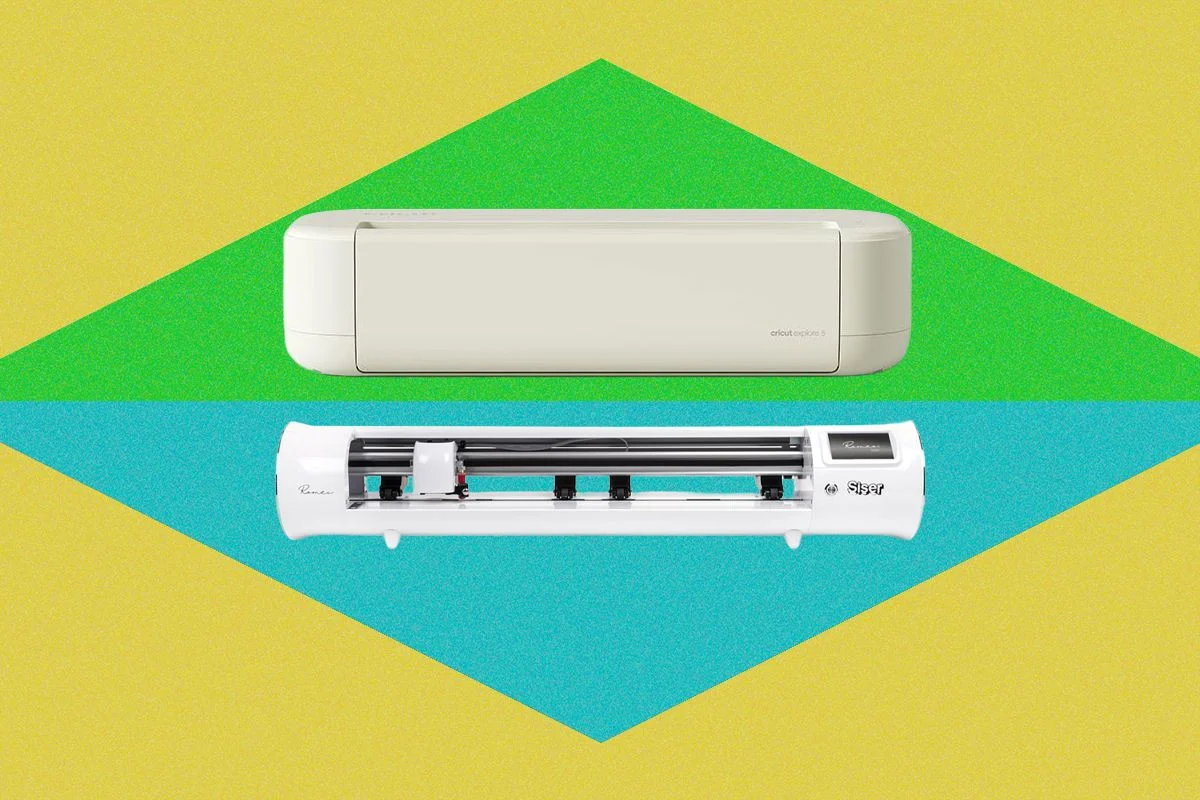
However, as the market matures, a distinct bifurcation has emerged. On one side stands the consumer-grade powerhouse, exemplified by the new Cricut Explore 5, designed for ease, community, and accessibility. On the other, the professional-leaning Siser Romeo, a machine engineered for precision, high-volume production, and granular control. Deciding between them isn’t just a matter of price; it’s a question of where your creative journey is heading.

Main Facts: The Battle of the Blade
The landscape of desktop cutting has shifted. The Cricut Explore 5, retailing at approximately $199 for the base model, positions itself as the ultimate "Weekend Warrior" tool. It is built to minimize friction, relying on a robust software ecosystem to guide the user from concept to completion.
Conversely, the Siser Romeo—a $600 investment—is a different beast entirely. It eschews the "plug-and-play" philosophy in favor of a "command-and-control" approach. While both machines can technically cut cardstock, vinyl, and heat-transfer vinyl (HTV), they serve vastly different archetypes: the experimental crafter who changes projects weekly versus the small-business owner who needs to produce 50 identical shirts before a morning deadline.

A Chronology of the Testing Process
To determine the true tipping point between hobbyist and professional workflows, I spent several weeks putting both machines through an exhaustive battery of tests.
Phase 1: The Learning Curve
The first week was dedicated to onboarding. With the Cricut Explore 5, the process was nearly instantaneous. Using the "Design Space" software, I pulled from a library of pre-made templates. The software’s intuitive interface felt like a guided tour, making it nearly impossible to fail.

The Siser Romeo required a steeper learning curve. Its native software, "Leonardo," demands more technical literacy. One must be comfortable with vector nodes, layer separation, and manual force adjustments. My initial attempts at a "Gigi" sweatshirt resulted in wasted material, as I had to retrain my muscle memory to account for the Romeo’s different origin points and manual feed system.
Phase 2: Material Versatility
Weeks two and three focused on a variety of media. I tested both machines on:

- Layered cardstock bookmarks: Cricut excelled at the intricate designs but struggled with inconsistent pressure, requiring an occasional X-Acto knife touch-up.
- HTV Hoodies: The Romeo’s ability to handle rolled material without a mat saved significant time on repeat batches.
- Bonded Cotton Appliqué: Using aftermarket blades, both machines handled the task, though the Romeo’s sturdier carriage felt more reliable during long-duration cuts.
Supporting Data: Workflow Efficiency
When analyzing the data, the differences in production efficiency become stark.
| Feature | Cricut Explore 5 | Siser Romeo |
|---|---|---|
| Primary User | Casual/Hobbyist | Pro/High-Volume |
| Connectivity | Bluetooth (Variable) | Wi-Fi (Stable) |
| Software | Design Space (Guided) | Leonardo (Granular) |
| Material Handling | Mat-reliant | Roll-feed / Pinch Rollers |
| Noise Level | Whirring (Printer-like) | Chirping (Dial-up style) |
The Cricut’s "Load and Go" system is a triumph of user experience design. It eliminates the anxiety of manual settings. However, the Siser Romeo’s "tiling" feature—which automatically optimizes material usage for duplicate designs—is the clear winner for anyone looking to scale a side hustle.

Official Perspectives and Ecosystems
Cricut has built its brand on the "community-as-a-service" model. If you encounter an issue, a quick search on TikTok or YouTube reveals a thousands-strong community of users who have solved the exact problem you’re facing. The software, while occasionally prone to Bluetooth connection drops, acts as a creative safety net.
Siser takes a different stance. Their documentation is technical and their software is powerful, but they offer little in the way of "hand-holding." Their approach assumes the user is the expert, or at least aspires to be one. During testing, I encountered generic error messages in the Leonardo software that offered no troubleshooting path. Siser’s reliance on the user to solve their own technical hurdles is a deliberate design choice, favoring utility over accessibility.

Implications: When to Graduate?
The decision to upgrade your hardware is rarely about the machine itself and more about the evolution of your intent.
The Case for the Cricut Explore 5
If your workspace is a shared office or a corner of a dining room table, the Explore 5 is the superior choice. Its compact, clamshell design hides away neatly, protecting the sensitive internal components from the dust and pet hair that define a busy home studio. If you find joy in the discovery of new projects—scrolling through templates and finding inspiration in someone else’s shared design—the Cricut ecosystem is unparalleled.

The Case for the Siser Romeo
If you are moving beyond "crafting" and into "production," the Romeo is the inevitable destination. Its industrial-grade build—characterized by a lack of flex, minimal vibration, and high-precision pinch rollers—means that once you dial in your settings, the machine is a workhorse. It is a permanent fixture, meant to be left on a dedicated table, ready for the grind of repeat orders.
The Final Verdict
The "tipping point" occurs when the convenience of the Cricut starts to feel like a limitation. When you find yourself annoyed by having to navigate a software wizard for the hundredth time, or when you’re manually cutting down large rolls of vinyl just to fit a mat, you have outgrown the hobbyist tier.

For the majority of readers, the Cricut Explore 5 offers a frictionless entry into a world of endless creative possibility. It is, quite simply, the most accessible tool on the market. But for the serious creator—the one who measures their work in units per hour rather than hours per project—the Siser Romeo is not just a cutter; it is a professional-grade partner.
As I look at my own home office, once a sterile, "corporate-remote-worker" environment, now a chaotic landscape of glitter vinyl, discarded scraps, and multiple pairs of specialized scissors, I realize that both machines have a place. The Explore 5 handles my whimsical, last-minute birthday card designs, while the Romeo sits ready for the heavy lifting. The choice is yours: do you want a craft assistant, or a production partner? Your answer will define your next creative chapter.