In the modern era of hybrid work, the quality of your digital presence is no longer just a technical detail—it is your professional identity. Whether you are navigating high-stakes corporate boardroom meetings, delivering academic lectures, or streaming to a global audience, the hardware you use defines how you are perceived. Yet, assessing the "best" webcam is a notoriously slippery endeavor. Every device handles light, color, and motion differently, and external variables—such as room orientation, wall color, and ambient lighting—can dramatically alter performance.
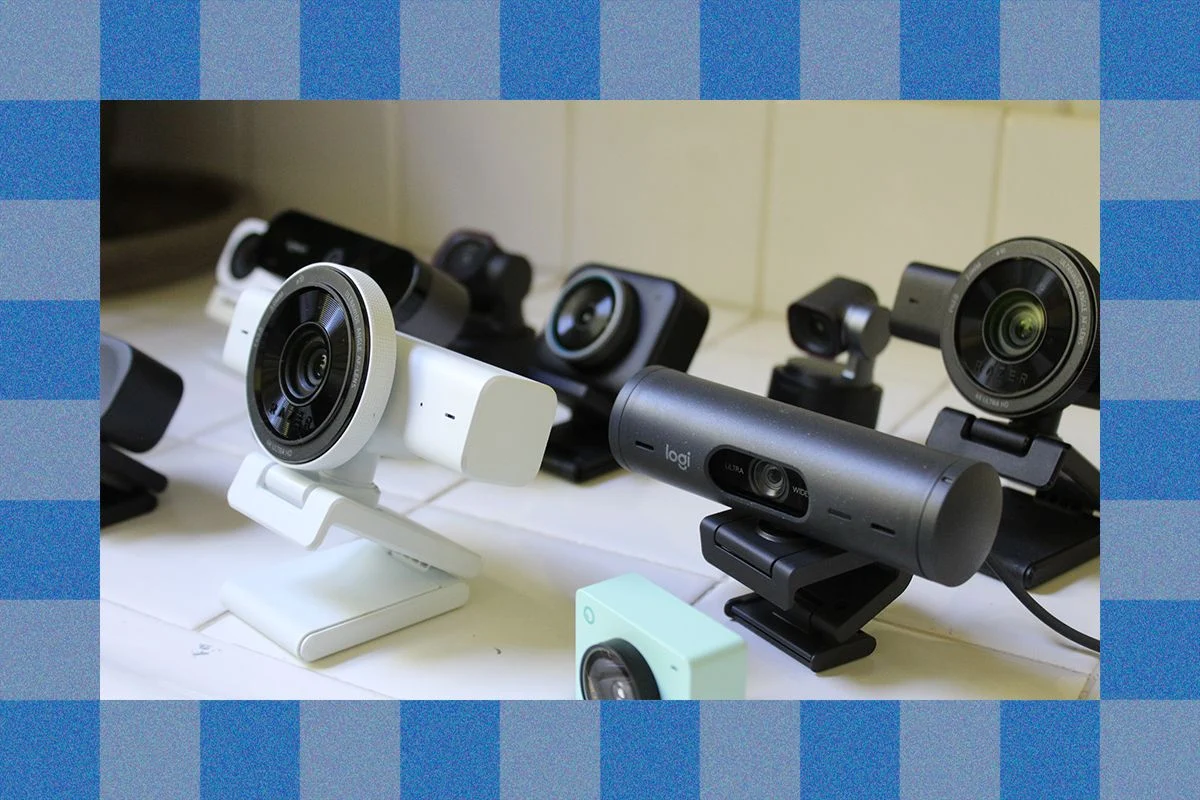
To cut through the marketing jargon, I conducted a rigorous, side-by-side evaluation of over 15 leading webcams, testing them simultaneously under identical, challenging conditions. My goal was simple: to determine which devices actually justify their price tags and which are merely legacy hardware in fancy packaging.
The Verdict: The Gold Standard in Video Quality
After extensive benchmarking, one device has emerged as the definitive leader for the average user: the Insta360 Link 2C Pro ($200).

Why the Insta360 Link 2C Pro Wins
The Link 2C Pro is a masterclass in design and functionality. It is remarkably compact and lightweight, making it equally effective on a sleek laptop lid or a heavy-duty external monitor. Its most innovative feature is its magnetic mounting system. Unlike the plastic clips found on competitors like the Logitech MX Brio—which can feel flimsy or struggle with rotation—the Insta360’s magnetic mount is robust, secure, and allows for incredibly smooth, intuitive adjustments.
From an image quality perspective, the Link 2C Pro is in a league of its own at the $200 price point. In my testing, which included a notoriously poorly lit home office, the camera consistently outperformed its rivals in managing high-contrast environments. It effectively prevented the common "blown-out" highlight effect often caused by overhead office lighting or backlighting from windows. Its large 1/1.3-inch CMOS sensor creates a natural, soft bokeh effect, mimicking the depth-of-field characteristics of a DSLR camera, a feat most flat-looking webcams fail to achieve.
The Standard Model
For those seeking a more budget-conscious alternative, the Insta360 Link 2C ($150) remains a formidable contender. While it features a slightly smaller sensor and a narrower aperture—resulting in marginally more noise in high-contrast areas—it still punches well above its weight class, outperforming industry veterans like the Razer Kiyo V2 and the Logitech Brio 4K.

The Rise of PTZ: AI-Powered Tracking
Pan-Tilt-Zoom (PTZ) webcams represent a significant leap in versatility. These devices sit on motorized gimbals and utilize advanced face-tracking AI to keep you in the frame, even if you are moving about your office or pacing during a presentation.
The Obsbot Tiny 3: The Premium Powerhouse
If you require professional-grade tracking, the Obsbot Tiny 3 ($349) is the gold standard. It is the most expensive unit in our testing, but it delivers on that price with class-leading color accuracy. It reproduces skin tones and environmental colors with a fidelity that avoids the artificial "over-processed" look common in lower-end AI cameras.
Key PTZ Features
- Object and Voice Tracking: The Tiny 3 utilizes sophisticated AI to follow your movements, making it ideal for educators or presenters.
- Gesture Control: You can trigger zoom or tracking presets with simple hand movements, eliminating the need to fumble with desktop software during a live session.
- High Frame Rates: The ability to shoot at 120 frames per second at 1080p provides a fluidity that is rare in the webcam market.
For those who want the PTZ experience without the premium price, the Insta360 Link 2 Pro ($249) offers excellent low-light performance and a more accessible, mobile-friendly interface for controlling the gimbal, making it a compelling alternative to the Obsbot ecosystem.
-SOURCE-Julian-Chokkattu.jpg)
Budget Alternatives and The Case for Lighting
If you are strictly on a budget, caution is advised. Many "budget" webcams are simply rebadged hardware that fails to outperform modern laptop cameras. If your current camera is subpar, you are often better off investing in a dedicated light source.
Recommended Budget Picks
- Anker PowerConf C200 ($66): While its mount leaves something to be desired, the image quality is acceptable for the price, provided your room is well-lit.
- Logitech Brio 300 ($60): A functional, no-frills upgrade over older models like the C920. However, be aware that it has a fixed 70-degree field of view, which provides a significantly narrower frame than most other modern webcams.
The "Light First" Philosophy
Before purchasing a budget webcam, consider the Logitech Litra Glow ($70) or the Lume Cube Mini LED Panel ($70). A small, diffused light source will do more to improve your video quality than a $100 camera ever could. Proper illumination compensates for the small physical sensors inherent in all webcams, effectively elevating the performance of whatever camera you currently own.
Technical Analysis: Sensors, Megapixels, and Reality
To understand why some cameras excel while others fail, one must look past the "4K" marketing.

The Sensor Size Myth
Resolution (1080p vs. 4K) is only half the story. The physical size of the image sensor is the true arbiter of quality. A larger sensor with a lower pixel count will almost always produce a cleaner, more detailed image than a tiny sensor packed with 20 megapixels. This is why the 1/1.3-inch sensor in the Insta360 Link 2C Pro outperforms many "4K" cameras with smaller sensors.
Frame Rates and Bandwidth
Most enterprise video conferencing software (Zoom, Teams, Meet) caps output at 1080p for bandwidth management. While 4K is useful for cropping or framing adjustments, it is rarely transmitted in its native resolution. Therefore, prioritize low-light performance and natural color processing over the raw resolution specification.
Chronology of Testing and Industry Trends
- August 2026 Update: This cycle of testing introduced the Dell Pro 5 and Dell Pro 7 to our database. While the Dell Pro 5 serves as a capable mid-range device with Windows Hello integration, the Dell Pro 7 failed to differentiate itself enough from the competition to justify its $200 price point.
- The "Legacy" Problem: The Logitech C920, a stalwart of the industry for 14 years, remains on the market. While historically significant, it is now obsolete. Consumers should avoid it in 2026 in favor of modern hardware that handles high-contrast lighting and digital processing with significantly more nuance.
Implications for the Future of Professional Video
As AI integration becomes the industry standard, we are seeing a shift toward "smart" cameras that handle image processing on-device. The ability for a camera to independently adjust exposure, focus on a face, or track a speaker is no longer a luxury—it is becoming a baseline expectation.

However, this reliance on AI is a double-edged sword. Heavy-handed processing can lead to a "plastic" skin-smoothing effect that is often undesirable for professional settings. The best cameras, such as the Insta360 and the Obsbot series, allow for granular control over these settings, ensuring that the technology aids the user rather than distracting from the content.
Final Recommendations for the Professional
- For the Best Overall Performance: Go with the Insta360 Link 2C Pro. Its combination of low-light sensor quality, magnetic mount, and natural color processing is currently unmatched.
- For the Content Creator/Presenter: The Obsbot Tiny 3 is the gold standard for tracking and versatility.
- For the Minimalist: Use your smartphone as a webcam via the Belkin MagSafe Mount. The sensors in modern smartphones are, in almost every instance, superior to dedicated webcams.
As we move deeper into 2026, the gap between consumer-grade webcams and professional studio setups continues to shrink. By choosing hardware that prioritizes sensor size and natural image processing, you can ensure that your digital presence remains as professional as your work.