In the world of digital photography, the difference between a masterpiece and a missed opportunity often comes down to sharpness. A soft focus, motion blur, or the degradation of fine detail during compression can turn a high-stakes shot into a frustrating experience. While modern camera sensors and lenses are more capable than ever, post-processing remains an essential pillar of the professional workflow.
For photographers, archivists, and content creators, the challenge is not just "sharpening" an image, but restoring authentic detail without introducing the "crunchy," over-processed artifacts that plague amateur edits. This guide evaluates the six premier software solutions available today, analyzing their deep-learning capabilities, utility in real-world scenarios, and how they stack up in a professional production environment.

The Core Problem: Why Images Lose Their Edge
Softness in photography is rarely the result of a single factor. It can stem from diffraction at small apertures, micro-vibrations, imperfect focus, or heavy image compression during file sharing. Traditional sharpening tools—such as the standard Unsharp Mask—often fail because they simply boost contrast at edges, which can lead to unsightly halos or "ringing" artifacts.
Modern AI-driven software approaches this differently. By utilizing deep-learning neural networks, these tools are trained to recognize the difference between noise and texture, allowing them to reconstruct missing data and enhance clarity while preserving the natural "feel" of the original photograph.

Chronology of Innovation: From Manual Filters to Neural Networks
The evolution of image enhancement has followed a distinct path:
- The Manual Era (Pre-2010s): Photographers relied on basic tools like the High Pass filter or Unsharp Mask in software like Photoshop. These methods required a delicate touch and significant manual labor.
- The Algorithmic Rise (2010–2018): Tools like Lightroom introduced more sophisticated detail panels, incorporating noise reduction and lens-specific corrections that improved sharpness globally.
- The Deep-Learning Revolution (2019–Present): The introduction of AI models (like those found in Topaz and Aiarty) marked a turning point. These tools analyze the image content—identifying faces, fur, architecture, or foliage—and apply context-aware sharpening, allowing for the restoration of lost resolution through intelligent upscaling.
Deep Dive: Evaluating the Top 6 Sharpening Solutions
1. Aiarty Image Enhancer
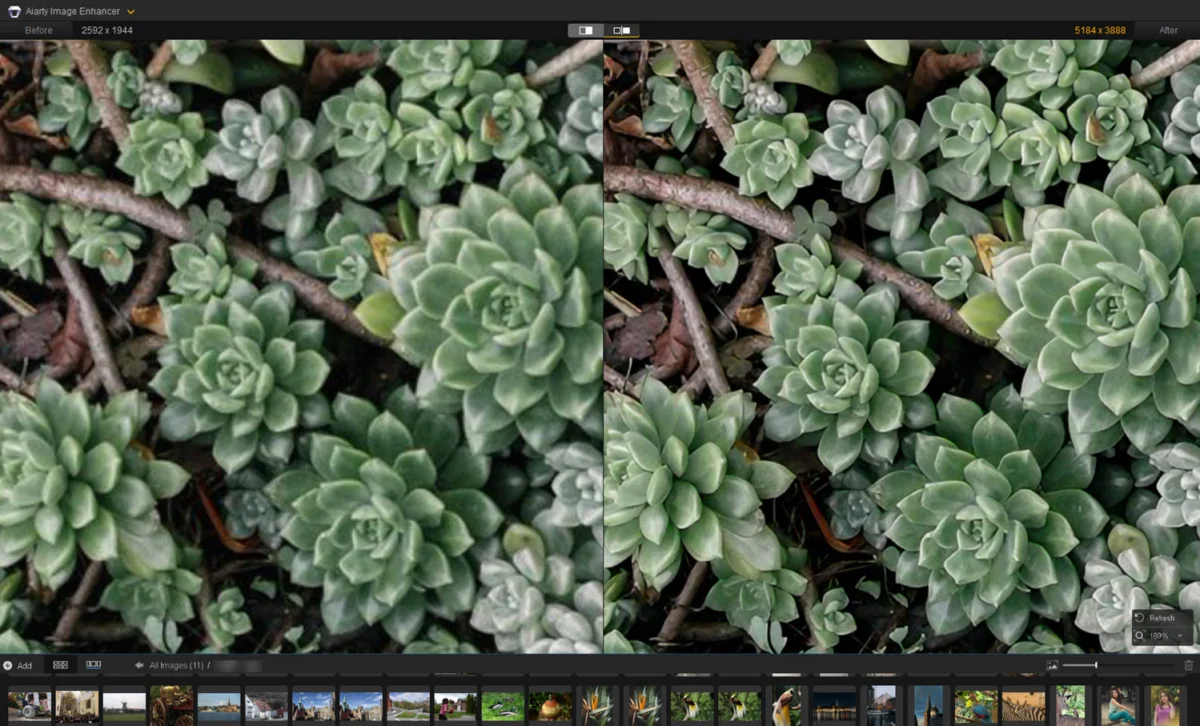
Aiarty has emerged as a powerhouse for those seeking a balance between automated ease and manual control.

- Key Strengths: The software features three distinct AI models: the "More-Detail" model, the "Real-Photo" model, and a specialized "Face Restoration" feature.
- Performance: During our testing, the "More-Detail" model proved exceptional at reclaiming lost definition in architectural structures and hair strands.
- Workflow: By adjusting the strength slider (ideally between 0.75 and 0.95), users can avoid the "plasticky" look often associated with aggressive AI sharpening. The inclusion of color contrast tuning within the enhancement tool saves time, allowing for a polished output without jumping between multiple applications.
2. Topaz Photo AI
Topaz remains the industry standard for many, largely due to its "Autopilot" feature.
- Key Strengths: It is highly intuitive. Upon importing a photo, the software analyzes it and recommends a specific suite of tools—Denoise, Sharpen, or Face Recovery.
- Performance: The "Refocus" module is highly effective for images suffering from motion blur or missed focus. However, it is resource-intensive; users on older hardware may experience significant lag during processing.
- Implication: It is a perfect "set-and-forget" tool for photographers who need to process large batches of images quickly and reliably.
3. Adobe Lightroom
For the photographer already invested in the Adobe ecosystem, Lightroom is often the first line of defense.

- Key Strengths: It is integrated into the RAW development workflow. The "Masking" feature is a game-changer, allowing users to apply sharpening strictly to a subject while keeping the background soft.
- Performance: While it lacks the extreme generative upscaling of dedicated AI tools, its new AI Denoise feature provides a cleaner base than ever before, making manual sharpening significantly more effective.
4. DxO PureRaw 6
DxO occupies a unique niche, focusing almost entirely on the early stages of the RAW development pipeline.
- Key Strengths: Its "DeepPRIME" technology is widely considered the gold standard for noise reduction. By optimizing the RAW file before it even hits your editor, it provides a "cleaner" foundation for sharpening.
- Performance: It is less of a "sharpening" tool and more of a "clarity-restoration" tool. It excels at correcting lens softness, which is a common issue even with high-end glass.
5. Picsart
Designed for the mobile-first creator, Picsart offers an accessible, cloud-based solution.

- Key Strengths: Speed and convenience. It is perfect for social media content creators who need to quickly upscale and sharpen a JPEG on their phone.
- Performance: While it cannot compete with the deep-learning fidelity of Aiarty or Topaz, its auto-enhancement models are surprisingly effective for casual, lower-resolution web imagery.
6. GIMP (The Open Source Option)
GIMP remains the best free, open-source alternative for those who prefer full manual control.
- Key Strengths: It offers the industry-standard Unsharp Mask and High Pass filter methods without the cost of a subscription.
- Performance: It requires the most skill. The user must understand how to use blending modes (like "Overlay") to achieve the best results. It won’t "generate" new detail like an AI, but it is a robust tool for traditional, non-destructive editing.
Comparative Data Summary
| Tool | AI Capability | Batch Processing | Primary Use Case |
|---|---|---|---|
| Aiarty | High (3 Models) | Yes | All-in-one restoration & sharpening |
| Topaz | High (Autopilot) | Yes | Professional batch restoration |
| Lightroom | Moderate | Yes | Standard RAW workflow |
| DxO PureRaw | High (Noise-centric) | Yes | RAW-base optimization |
| Picsart | Moderate | No | Social media/Casual edits |
| GIMP | None | No | Manual, professional editing |
Implications for Your Workflow
Choosing the right software depends heavily on your specific needs:

- If you are a professional photographer: Investing in DxO PureRaw for your initial RAW processing, followed by Topaz or Aiarty for final sharpening, creates an unbeatable, high-fidelity pipeline.
- If you are an archivist: The "More-Detail" model in Aiarty is specifically suited for scanning and recovering old photos, as it balances noise removal with texture preservation better than standard filters.
- If you are a social media manager: The ease of Picsart or the integrated features of Lightroom will likely serve your needs best without over-complicating the edit.
Conclusion: Balancing Automation and Artistry
The era of blurry, unusable images is coming to a close. With the advent of sophisticated deep-learning models, photographers can now salvage shots that were previously deemed "un-sharpenable."
However, technology is only one half of the equation. Whether you use the automated "Autopilot" of Topaz or the granular manual controls in GIMP, the goal remains the same: to enhance the image in a way that respects the original intent of the capture. Always remember to use a light touch; in the race for sharpness, the most natural-looking result is usually the one that has been sharpened with restraint.

As you refine your workflow, consider utilizing free trials—like those offered by Aiarty—to see which model best complements your specific photographic style. The tools are here; now, it is time to put your best, sharpest work forward.