For parents, the mental load is not just a concept—it is a tangible, exhausting weight. Managing a family of five, with three children navigating separate school systems, staggered extracurricular activities, and the ever-shifting professional commitments of two working parents, is a logistical operation of military-grade complexity. For years, the standard solution has been a shared Google Calendar, a digital catch-all that is functional but often lacks the visibility required to keep a household running in lockstep.
As the boundaries between work, school, and home life continue to blur, a new generation of "connected" home management tools has emerged. Among them is the Skylight Calendar, a touchscreen-based hardware device designed to serve as the central nervous system of the family home. Does such a device actually bridge the gap between digital planning and physical execution, or is it just another screen requiring our attention?
The Quest for Synchronization: Moving Beyond the Smartphone
The reliance on personal smartphones for family coordination often creates a fragmented experience. When schedules live exclusively in individual pockets, the "family brain"—the collective awareness of who is where and when—ceases to exist. The motivation behind integrating a device like the Skylight Calendar into the kitchen is to move from personal notification silos to a communal hub.
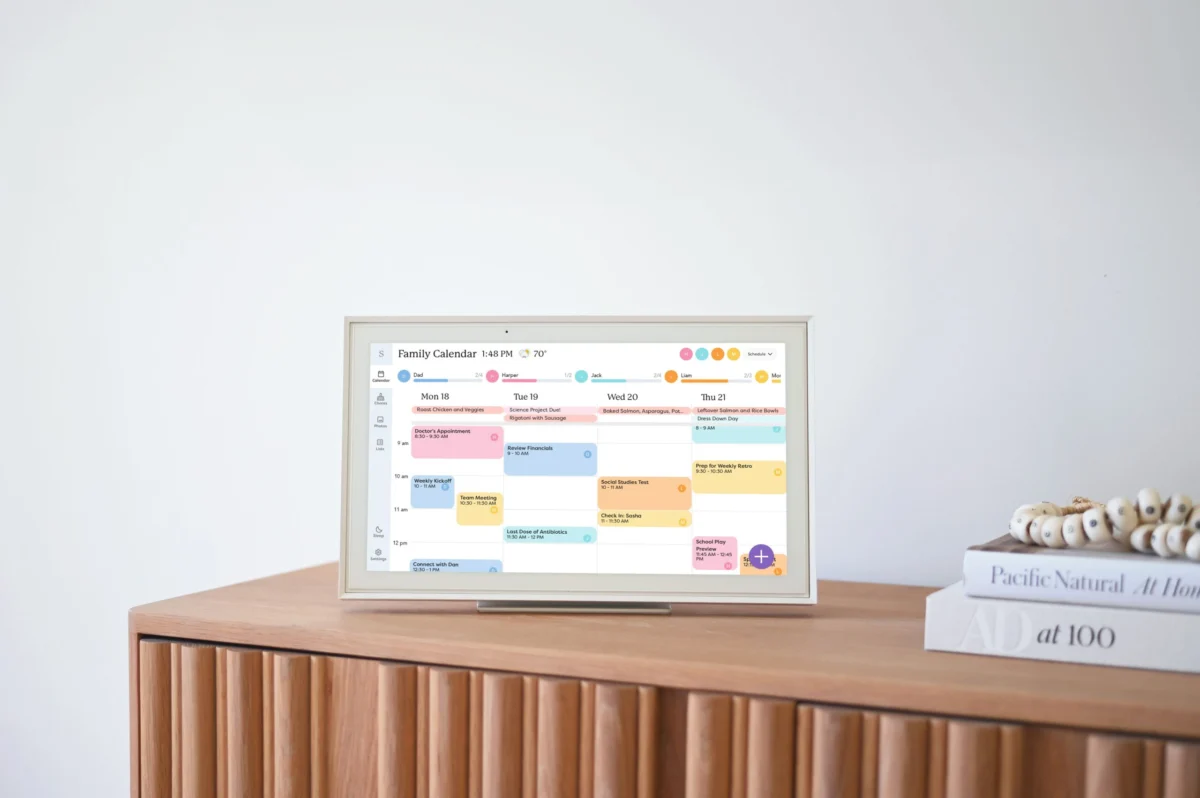
The device itself, which comes in 10, 15, and 27-inch iterations, is designed to be a permanent fixture. Its presence is meant to act as an anchor, a physical manifestation of the family’s shared time. By mounting the screen in a high-traffic area, the goal is to foster transparency. For families with older children, particularly teenagers and tweens, this transition from "parent-directed scheduling" to "family-managed scheduling" is a critical developmental milestone.
Chronology of Adoption: From Unboxing to Integration
The integration process for a device like the Skylight begins with the physical setup, but the real labor lies in the digital synchronization.
- The Setup Phase: Upon unboxing, the 15-inch screen was positioned near the kitchen workspace. The setup involved downloading the companion app across all family devices, effectively tethering the mobile experience to the fixed wall unit.
- Importing the Data: The device integrates with existing ecosystems, including Google, Apple, Microsoft, and Yahoo calendars. For the average user, this is the most daunting step. Importing a legacy Google Calendar creates the base layer of the family’s schedule.
- The Delegation Phase: Once the data was imported, the next step involved color-coding individual family members. This visual taxonomy is essential; it allows a quick, at-a-glance understanding of who has a conflict. The addition of a "household chores" category served a dual purpose: it tracked labor and subtly highlighted the disparity in domestic responsibilities.
- Cultural Shift: Within weeks, the device moved from being a curiosity to a utility. Children began checking the calendar before making social plans, and the constant "Mom, can I do X on Thursday?" questions decreased as the children realized the information was publicly available.
Supporting Data and Features: The Cost of Efficiency
The utility of these devices is often partitioned by a subscription model. In the case of Skylight, the "Plus" subscription—priced at $79 annually—unlocks the more advanced AI-driven features.
The Role of AI in Domestic Labor
The inclusion of "Sidekick," an AI-powered assistant, represents a significant leap from traditional calendar apps. By allowing users to forward emails or upload photos of paper schedules, the assistant attempts to alleviate the manual entry burden. While the OCR (Optical Character Recognition) technology is not yet perfect—often requiring manual tweaks—it provides a significant time-saving shortcut compared to typing every event by hand.
Recipe and Grocery Management
One of the most touted features is the integrated meal planner. The ability to scan a physical recipe and have the ingredients auto-populate a shared grocery list is a bridge between the physical act of cooking and the digital task of shopping. However, as with most AI tools, the execution can be overly literal. While it excels at simple recipes, it can struggle with pantry staples, occasionally adding unnecessary items like individual spices to a shopping list.
Official Perspectives and Market Competition
While Skylight represents a hardware-first approach, the market is crowded with software-only competitors. To understand the landscape, one must look at alternatives like the Jam Family Calendar and Family Wall.
Comparative Analysis
- Jam Family Calendar: Focuses on a streamlined, intuitive interface that mimics the simplicity of standard digital calendars while adding the necessary "family-share" layer. It is a solid choice for those who prefer to keep their household management entirely within their smartphone.
- Family Wall: This platform adopts a "maximalist" approach. Beyond simple scheduling, it integrates financial budgeting, document storage, and location tracking. For families prioritizing security and total life management, this represents a significant competitor. Its "Countdown to Special Days" feature has proven to be a popular, if simple, solution for the chronic problem of forgotten birthdays and anniversaries.
Implications: The Privacy Trade-Off
The move toward a shared, transparent family calendar is not without its complications. A primary concern is the erosion of personal privacy. When a parent syncs their master Google Calendar, they are often importing more than just appointments. Personal reminders—such as birthday gift purchases or private doctor appointments—can inadvertently become public knowledge.
This necessitates a change in user behavior. Parents must learn to compartmentalize their digital notes or utilize secondary, non-synced calendars for sensitive information. There is a distinct irony in adopting a tool to reduce stress that simultaneously forces the user to be more vigilant about their digital hygiene.
Critical Challenges and Limitations
Despite the clear benefits of centralization, the hardware-centric approach has distinct drawbacks:
- The Power Dependency: Without an internal battery, the device is tethered to wall outlets. This limits the ability to interact with the device comfortably while sitting or relaxing, forcing a reliance on the mobile app for active editing.
- The "Notification Fatigue": Constant alerts and the visibility of every task can feel overwhelming for younger children. There is a fine line between keeping a family organized and creating a high-pressure environment where every moment is accounted for.
- The Persistence of Old Habits: Despite the sophistication of these tools, old habits die hard. The reliance on legacy systems (like a standard Google Calendar) often persists out of sheer muscle memory. The goal is to reach a point where the new system is the primary source of truth, but that transition period can last months.
Conclusion: Is It Worth the Investment?
The modern family is essentially a small business, requiring coordination, inventory management, and strategic planning. Devices like the Skylight Calendar, along with robust app-based competitors, offer a path toward reducing the "mental load" that leads to burnout.
While no device can solve the underlying issues of household inequality or the sheer volume of tasks that a family must complete, they provide a framework for delegation and visibility. By moving scheduling out of the individual mind and into a communal space, families can reclaim some of the bandwidth lost to the daily grind of coordination.
As these tools continue to evolve, particularly with the integration of more sophisticated AI, the hope is that they will become even more seamless. For now, they serve as a valuable, if imperfect, step toward a more organized family life. The final frontier, as many parents would agree, remains the laundry—a task that, for all our technological progress, still requires the human touch.