In the modern professional landscape, the laptop has become the singular command center for both work and play. However, as manufacturers shave millimeters off device chassis to achieve sleek, ultra-portable designs, the physical connectivity of our machines has suffered. The "dongle life"—a chaotic tangle of adapters and cables—is a reality for many. While a standard USB hub can bridge the gap for casual users, true power users require the robust, stationary power of a dedicated docking station.
We have rigorously tested dozens of these devices, moving past the marketing jargon to determine which ones offer genuine value. While many products on the market are "fine," only a select few truly optimize your desktop environment. Whether you are a creative professional pushing high-resolution video or a data analyst juggling multiple displays, the right dock is the difference between a seamless workflow and a persistent headache.
Understanding the Landscape: Docking Station vs. USB Hub
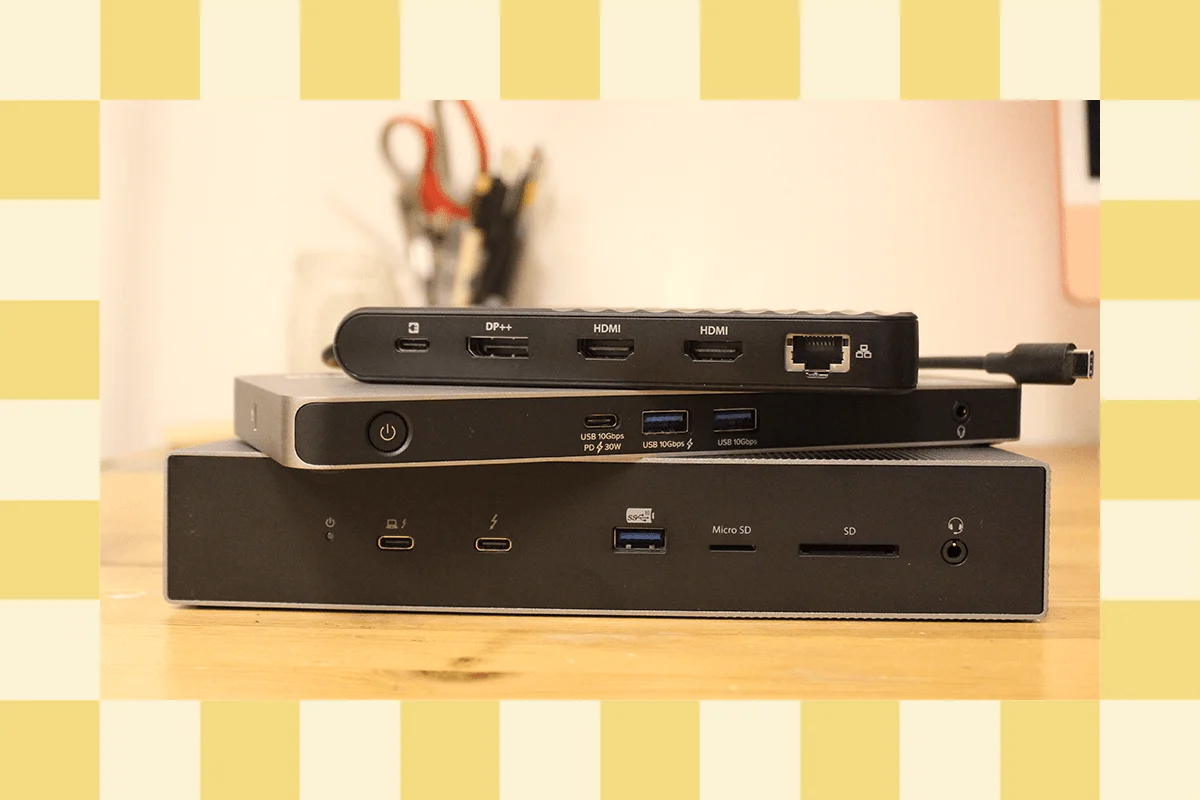
Before investing in a high-end dock, it is critical to distinguish between the two primary categories of connectivity hardware. A USB hub is designed for mobility. These are lightweight, often bus-powered devices that expand your port selection on the go. They are perfect for the coffee-shop warrior who needs to connect a mouse, an SD card, and a single HDMI display to a MacBook Air.
Conversely, a laptop docking station is a permanent desktop fixture. These units are designed to act as a singular point of contact for your entire workstation. They require their own dedicated power supplies (usually bulky power bricks) to drive high-speed data, provide robust pass-through charging to your laptop, and maintain consistent signal integrity for multiple external monitors. When you return to your desk, you plug in one cable, and your entire office—monitors, external drives, Ethernet, and peripherals—comes to life instantly.

The Evolution of Connectivity: A Chronology of Standards
The history of the docking station is inextricably linked to the evolution of the USB-C and Thunderbolt protocols.
- The Early Days (Pre-2015): Docking was often proprietary, requiring physical "click-in" plates specific to certain laptop brands.
- The USB-C Revolution (2015–2018): The arrival of USB-C offered the promise of a universal connector, but early implementations were fraught with compatibility issues and inconsistent power delivery.
- Thunderbolt 3 & 4 (2018–2023): This era standardized the "one cable to rule them all" philosophy. Thunderbolt 4 provided the bandwidth necessary for dual 4K displays and consistent 40 Gbps data speeds, cementing its place as the gold standard for high-end professional workstations.
- The Dawn of Thunderbolt 5 (2024–Present): With the introduction of Thunderbolt 5, we are now seeing bandwidth ceilings shatter. These docks can support triple 4K displays at 144 Hz and deliver up to 240 watts of power, marking a significant leap forward for high-performance computing.
Analysis of Top-Tier Alternatives
While our primary recommendations often focus on the "best in class," several other devices deserve your attention for their unique features and niche capabilities.
1. Baseus Spacemate Air 12-in-1: The Budget-Friendly All-Rounder
The Baseus Spacemate Air is a compelling alternative for those who want extensive connectivity without the premium price tag. At $200, it provides a functional bridge to a multi-monitor setup, supporting two 4K displays. It is particularly well-suited for older MacBook Air owners who need a central hub.
- Pros: Cost-effective, solid 4K support, compact footprint.
- Cons: Integrated cable design limits durability; lacks dedicated memory card slots; secondary USB ports exhibit slower data transfer speeds.
2. Belkin Connect Pro Thunderbolt 4 Dock: The Reliable Standard
Belkin has long been a staple in the peripheral space. Their Connect Pro ($300) offers a robust 12-port array. It is reliable, supports 60 Hz refresh rates on dual 4K monitors, and delivers 90W of power. It is a workhorse that, while not flashy, gets the job done consistently.

3. Satechi Thunderbolt 4 Slim Pro Hub: Minimalist Precision
Sometimes, less is more. For users who value desk aesthetics, the Satechi Slim Pro ($200) is a masterclass in minimalism. Encased in high-quality, sturdy aluminum, it focuses on what matters: three Thunderbolt 4 ports with full 40 Gbps throughput. It is the ideal choice for those who need high-speed data storage and display connectivity without the clutter of extraneous legacy ports.
4. Satechi Triple 4K Docking Station: Multi-Monitor Mastery
For power users who need to sprawl across three screens, this $300 unit is a standout. It supports a mix of HDMI and DisplayPort outputs, providing 4K at 60 Hz across the board. While it lacks the extreme refresh rates favored by competitive gamers, it is an exceptional solution for office and media production environments.
5. Kensington Triple Video Mobile Dock: The Paradoxical Powerhouse
At $90, this is the most affordable entry on our list. Despite its "mobile" moniker, it packs a surprising punch: two HDMI ports and a DisplayPort capable of driving triple 1080p or dual 4K displays. It also offers 85W of pass-through charging. Note, however, that macOS users may find the dual-4K support limited compared to Windows counterparts.
6. Satechi Dual Docking Station and Stand: Ergonomic Innovation
This device reimagines the form factor entirely. By sitting under the laptop, it provides an ergonomic incline and tucks cables neatly out of view. A standout feature is the built-in NVMe SSD enclosure, allowing users to expand their storage capacity without needing additional external drives cluttering the desk.

7. Sonnet Echo 13 Thunderbolt 5 Dock: The Cutting Edge
As one of the first Thunderbolt 5 docks, the Sonnet Echo 13 is a glimpse into the future. It includes an integrated Kingston SSD and an exhaustive array of ports. However, the price ($460) and the use of a plastic chassis—which feels underwhelming for the investment—make it a niche product for early adopters.
8. Ivanky FusionDock Max 1: Luxury for MacBook Pro Users
If you are running a top-tier M-series MacBook Pro, the Ivanky FusionDock Max 1 ($330) is the definition of luxury. Capable of supporting up to four 6K displays, it is designed for the absolute upper echelon of video editors and designers. It is excessive for the average user, but for a professional workstation, it is unrivaled.
9. Ugreen Revodok Max 213: The High-Resolution Specialist
For those who require 8K resolution, the Ugreen Revodok Max 213 is a rare find. Its ability to handle extreme resolutions while maintaining dual downstream Thunderbolt 4 ports makes it a specialized tool for high-end media ingest and display work.
Critical Considerations: Technical Specifications Explained
Navigating the specifications of these devices is notoriously difficult due to industry-wide obfuscation. Here is how to decode the jargon:

- Speed over Labels: Do not rely on "USB 3.0" or "USB 3.1" labels, as these terms have been rebranded multiple times. Always look for the specific speed rating (e.g., 5 Gbps, 10 Gbps, or 40 Gbps) listed on the port.
- Upstream vs. Downstream: Remember that "Upstream" ports are for the connection to your host computer, while "Downstream" ports are for your peripherals. Mixing these up can lead to connectivity failures.
- The DisplayLink Factor: macOS has inherent limitations regarding multi-monitor support. Docks using DisplayLink technology can circumvent these by creating a "virtual GPU." While effective, users should be aware that this can occasionally result in latency or minor graphical artifacts compared to native Thunderbolt video output.
Implications for the Future of Work
The shift toward Thunderbolt 5 represents more than just a speed boost; it represents the convergence of high-performance computing and mobile convenience. As laptops continue to become thinner and more powerful, the reliance on external "intelligence"—provided by these docking stations—will only increase.
For the average professional, the decision should be guided by the number of displays you need to drive and the amount of power your laptop consumes. If you are a casual user, a $90-$200 hub will suffice. If you are a professional, investing in a $300+ Thunderbolt 4 or 5 dock is a long-term investment in your productivity.
When choosing your next dock, consider your desk setup as a permanent ecosystem. A good docking station should be invisible—a silent, powerful partner that allows you to connect your world with a single click. Choose wisely, and you will find that the right hardware doesn’t just manage your peripherals; it elevates your entire professional life.