In the digital age, a "soft" image is often viewed as a missed opportunity. Whether you are a professional photographer dealing with the limitations of a high-ISO shot, or a family historian attempting to digitize a blurred legacy photo, the loss of fine detail and edge contrast can be disheartening. Modern image processing has moved beyond simple "unsharp mask" filters; we are now in the era of deep-learning-based restoration.
This guide provides a comprehensive evaluation of the six most effective photo sharpening and enhancement tools currently available. We examine their capabilities, ideal use cases, and how they stack up in a professional workflow.

The Core Problem: Why Images Lose Sharpness
Digital images often lack definition due to motion blur, missed focus, camera shake, or the inherent softness of low-quality optics. Traditional sharpening tools often struggle with these issues, leading to "halos"—glowing artifacts around high-contrast edges—or the "crunchy" look caused by over-processed, pixelated noise.
Effective sharpening isn’t just about cranking up contrast; it is about intelligent, localized restoration that preserves natural textures while eliminating digital noise.

Chronology of Image Enhancement Technology
The evolution of photo sharpening has moved through three distinct phases:
- The Manual Era (Pre-2010): Photographers relied on basic software like Photoshop’s Unsharp Mask (USM) or High Pass filters. These tools were essentially mathematical filters that increased contrast at edges, which were prone to user error and artifacting.
- The Hybrid Era (2010–2020): Tools like Lightroom introduced more advanced masking, allowing photographers to sharpen subjects while leaving backgrounds untouched. However, these tools remained limited by the quality of the source file.
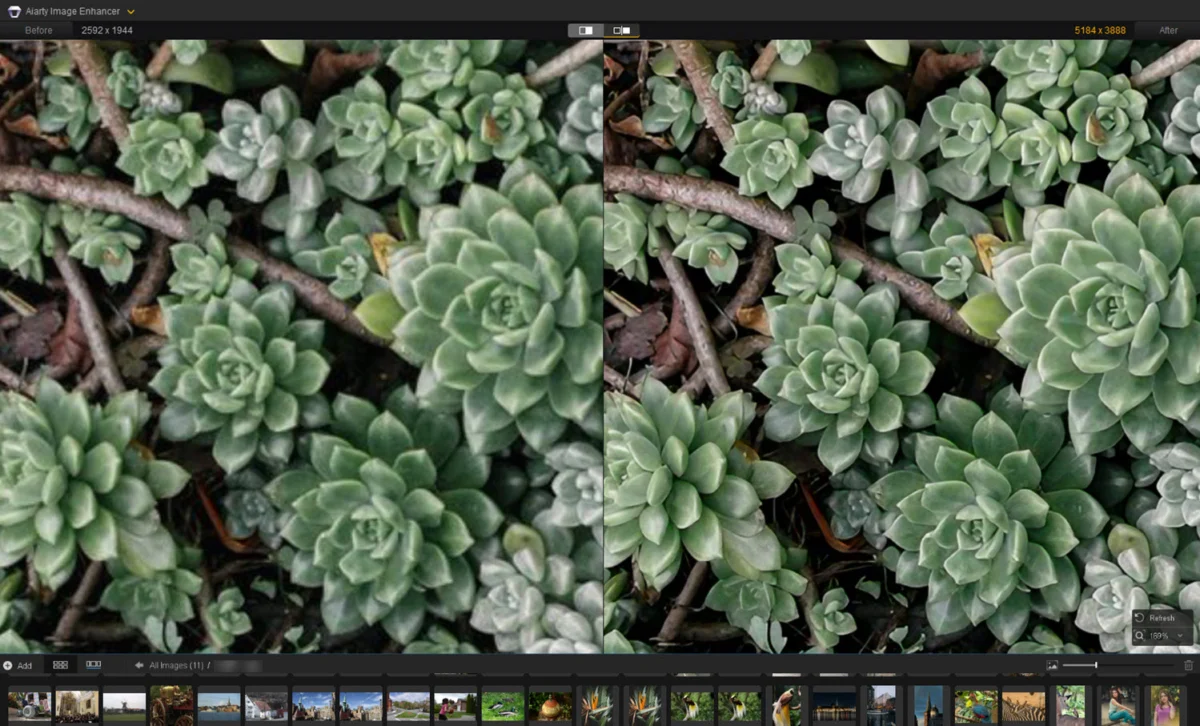
- The AI Inference Era (2021–Present): Deep-learning algorithms, such as those found in Aiarty Image Enhancer and Topaz Photo, now "learn" what an image should look like. These models can reconstruct missing pixels, remove compression artifacts, and intelligently distinguish between noise and texture.
Supporting Data: Comparative Analysis of Top Tools
To determine the best fit for your workflow, we have analyzed the current market leaders based on model complexity, processing power, and cost efficiency.

| Tools | Deep-learning Models | Batch Processing | Pricing |
|---|---|---|---|
| Topaz Photo | Autopilot AI Suggestions | Yes | Subscription-based |
| Aiarty Image Enhancer | 3 Specialized AI Models | Yes | $99 Lifetime License |
| Adobe Lightroom | AI Masking & Denoise | Catalog-based | Subscription-based |
| DxO PureRaw 6 | DeepPRIME Engine | Yes | $139.99 (Perpetual) |
| Picsart | Auto-Enhancement AI | No | Subscription-based |
| GIMP | N/A (Manual Filters) | No | Free / Open Source |
Detailed Evaluation: The Top 6 Solutions
1. Aiarty Image Enhancer: The Balanced Powerhouse
Aiarty stands out by offering a dedicated, high-performance environment for image upscaling and restoration. In our testing, the "More-Detail" model proved exceptionally capable at restoring facial features in old portraits without making them look artificial.
- Key Strength: Offers a granular, manual-control interface alongside automated AI models.
- Best Use Case: Rescuing old, blurry scans or low-resolution images that require significant upscaling (up to 16K) for large-format printing.
- Pro Tip: Use the "Face Restoration" feature in conjunction with a strength slider setting of 0.75–0.95 to maintain natural skin texture while eliminating blur.
2. Topaz Photo: The Autopilot Specialist
Topaz has long been the gold standard for AI-driven photography. Its "Autopilot" feature is a major time-saver, as it automatically detects whether an image needs noise reduction, sharpening, or lighting adjustments.

- Key Strength: Excellent integration of Denoise and Sharpening modules.
- Best Use Case: High-ISO wildlife or sports photography where noise often obscures detail.
- Implication: Because it relies heavily on local computing power, users with older hardware may find the "Refocus" model taxing on their GPU.
3. Adobe Lightroom: The Essential Workflow Integration
For most professional photographers, moving images to a separate app is a dealbreaker. Lightroom’s recent integration of AI-powered "Denoise" and "Masking" tools makes it the most convenient choice.
- Key Strength: Seamless integration into the RAW-to-export workflow.
- Best Use Case: Standard professional culling and editing where slight sharpening is needed as a final step.
- Methodology: Use the "Masking" tool to isolate subjects, then adjust the "Detail" and "Masking" sliders while holding the
Alt/Optionkey to see exactly which edges are being sharpened.
4. DxO PureRaw 6: The RAW Specialist
DxO is unique because it treats the sharpening process at the demosaicing level. By utilizing a massive database of camera and lens profiles, it corrects optical softness before you even begin editing.

- Key Strength: Unrivaled noise reduction via the DeepPRIME engine.
- Best Use Case: Photographers using older or budget lenses who want to maximize the sharpness of their RAW files.
5. Picsart: The Social Media Optimizer
Picsart serves a different demographic: the content creator who needs quick, one-tap fixes for images destined for mobile screens.
- Key Strength: Extremely accessible UI and instant upscaling.
- Best Use Case: Fixing compressed JPGs from mobile phones for Instagram or TikTok.
6. GIMP: The Budget-Friendly Standard
For those who prefer not to pay for subscriptions or proprietary software, GIMP remains the go-to. It does not "generate" missing detail, but its High Pass filters and Unsharp Masks remain powerful when used by a skilled hand.

Implications of AI in Photography
The rise of AI-driven sharpening has profound implications for the industry. While some purists argue that AI "reconstruction" is a form of digital art rather than pure photography, the utility is undeniable.
Ethical Considerations: When restoring historical or evidentiary images, it is critical to use "Natural" settings. Over-processing can lead to "hallucinated" details—pixels created by the AI that were never there in reality. Always keep a copy of your original file to maintain a chain of custody for your digital assets.

Summary and Recommendations
The choice of software ultimately boils down to your specific technical needs:
- For Professionals and Power Users: If you want a one-time purchase with high-end AI capabilities, Aiarty Image Enhancer is the current market leader for its value-to-performance ratio. If you are already deep in the Adobe ecosystem, Lightroom remains the most efficient choice for overall workflow.
- For RAW Photographers: DxO PureRaw 6 is essential for those who want the sharpest possible base from their optics before editing begins.
- For Casual/Mobile Users: Picsart provides the fastest route to a "social-media ready" image.
- For the Budget-Conscious: GIMP provides a robust, professional-grade manual toolset that, while steeper in its learning curve, costs nothing.
As technology continues to advance, the gap between "soft" and "sharp" is rapidly closing. Whether you are recovering a forgotten family memory or perfecting a commercial shoot, these six tools represent the state-of-the-art in modern digital image restoration.