In the world of digital photography, the difference between a masterpiece and a missed opportunity often comes down to sharpness. A soft, blurry image can diminish the impact of even the most compelling composition, stripping away the fine textures and edge contrast that define professional-grade work. Whether caused by a slight focus error, camera shake, or the natural softness inherent in some RAW files, blur is a common obstacle for photographers of all skill levels.
Fortunately, advancements in computational photography and deep-learning algorithms have revolutionized how we rescue "lost" images. Today, we are moving beyond simple unsharp masks into the realm of AI-driven reconstruction. This guide evaluates the six best photo sharpening tools currently available, analyzing their workflows, strengths, and ideal use cases to help you choose the right solution for your digital darkroom.

The Core Problem: Why Images Lose Their Edge
Softness in photography is rarely just one thing. It can manifest as a lack of micro-contrast, motion blur, or a loss of resolution that makes an image appear "mushy" upon close inspection. When we talk about "sharpening," we are essentially looking to perform two distinct tasks:
- Perceptual Sharpening: Enhancing the contrast along edges to trick the human eye into perceiving a higher level of detail.
- Reconstruction: Using AI models to infer missing pixel information, effectively "deblurring" and upscaling images to regain clarity that was never captured by the sensor.
1. Aiarty Image Enhancer: The Deep-Learning Specialist
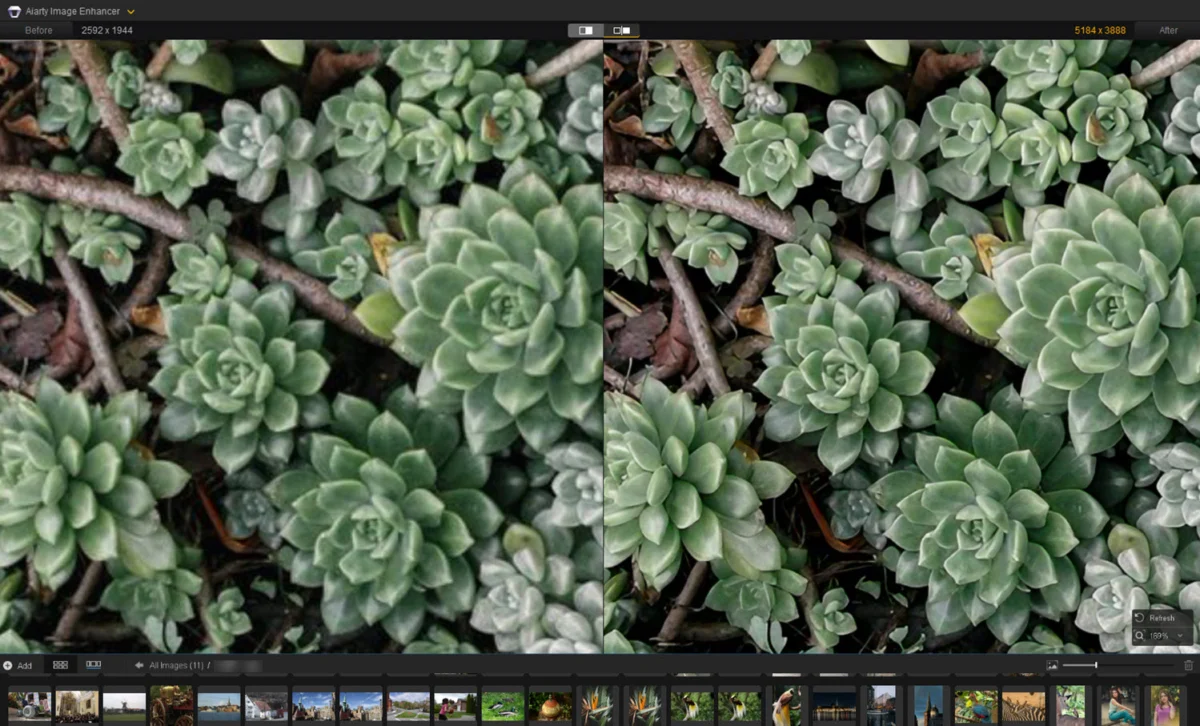
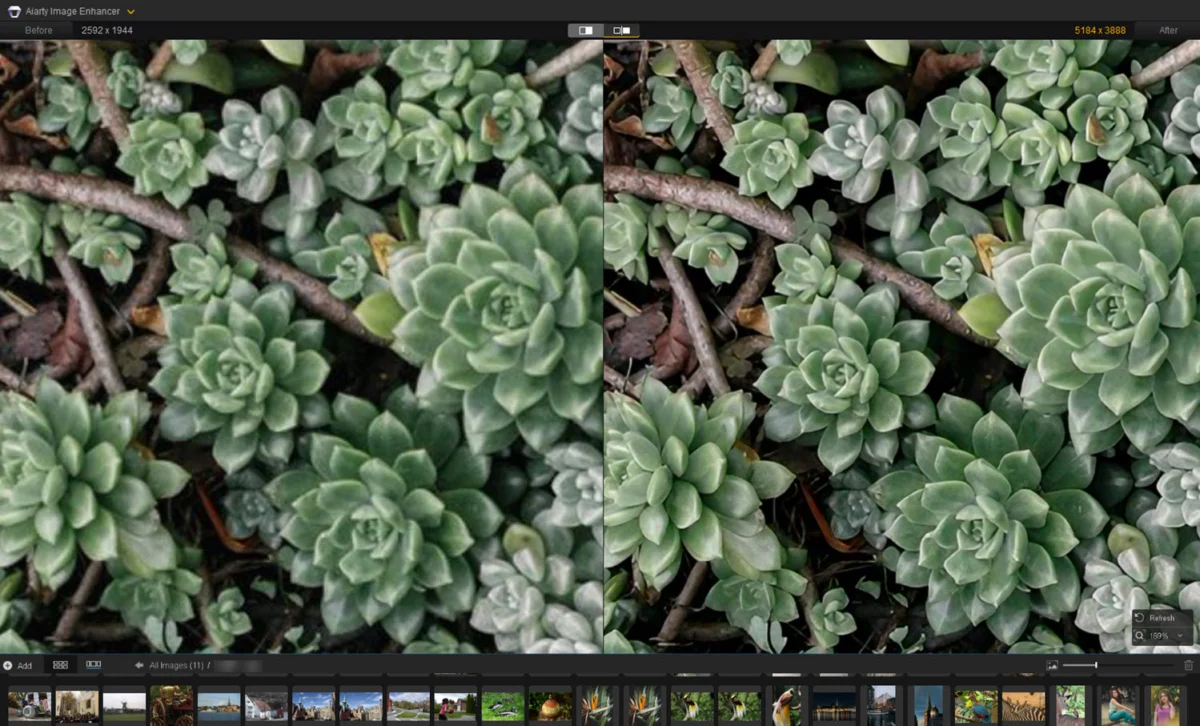
Aiarty Image Enhancer has emerged as a frontrunner for photographers looking to leverage artificial intelligence without a steep learning curve. It is particularly effective at turning low-resolution, noisy, or soft files into crisp, 4K-ready imagery.

Performance in Real-World Scenarios
In our testing, Aiarty excelled in several high-stakes scenarios:
- Portrait Recovery: By using the "More-Detail" model combined with its dedicated face restoration feature, the software successfully sharpened facial features, clarified hair strands, and smoothed skin without creating a "plastic" appearance.
- Wildlife Precision: For cropped images of wildlife, where plumage often loses definition, the "Real-Photo" model proved exceptional. It successfully restored the intricate textures around the eyes and beaks of avian subjects.
- Architectural Lines: When dealing with compression artifacts in building photography, Aiarty sharpened intersecting lines and roof structures with clinical precision, avoiding the common "halos" or "ringing" artifacts that plague older sharpening tools.
Why choose it: It offers a balanced approach for those who want AI-driven results but still desire granular control over strength settings. With a $99 lifetime license, it is a highly economical option compared to subscription-based competitors.

2. Topaz Photo: The Autopilot Powerhouse
Topaz Photo has long been a staple for professional photographers. Its primary strength lies in its "Autopilot" feature, which uses machine learning to detect the specific type of blur in an image—whether it’s motion blur, out-of-focus, or general lens softness—and applies the appropriate correction module.
Workflow and Limitations
Topaz is best for users who want a "one-click" fix. Its interface is intuitive, allowing you to toggle between Denoise, Sharpen, and Adjust Lighting. However, because it relies on heavy computational processes, the "Refocus" model can be demanding on older hardware. For most shots, a strength setting between 25-30 is the sweet spot; pushing it higher often results in an overly aggressive, crunchy look that detracts from the natural feel of the photograph.

3. Adobe Lightroom: The All-in-One Developer
Lightroom is the industry standard for a reason. For photographers who already live within the Adobe ecosystem, the sharpening tools are part of a seamless workflow that includes culling, color grading, and RAW development.
Technical Precision
Sharpening in Lightroom requires a more manual, disciplined approach. The "Detail" panel, combined with the "Masking" slider (accessed by holding the Alt/Option key), allows photographers to isolate sharpening to specific areas of the image. This prevents the background from becoming noisy or distracting. While it lacks the generative AI reconstruction found in standalone apps like Aiarty, its integration with the new AI Denoiser makes it an essential first step before any final output.

4. DxO PureRaw 6: The RAW Specialist
DxO PureRaw is built for a specific audience: the purist. It is designed to be used at the very beginning of the post-processing chain. By utilizing a massive database of camera and lens profiles, PureRaw performs "optical correction" to fix lens softness at the source.
The DeepPRIME Advantage
The inclusion of DeepPRIME technology is what sets this tool apart. It tackles noise and sharpness simultaneously during the RAW conversion process. By the time your image reaches your editor (like Photoshop or Lightroom), the "foundation" of the file is significantly cleaner, allowing for a much higher ceiling during the final sharpening stage.

5. Picsart: The Content Creator’s Toolkit
While not a professional-grade RAW processor, Picsart is the go-to solution for mobile photographers and social media content creators. Its online AI-upscaling and sharpening tools are remarkably fast and effective for lower-resolution images captured on smartphones.
Casual Application
Picsart shines when you need to quickly prepare an image for Instagram or a website. It automatically enhances edges and boosts resolution, making it ideal for those who don’t have the time or technical background for complex RAW editing. It is a lightweight, accessible tool that prioritizes speed and social impact over archival perfection.

6. GIMP: The Open-Source Classic
For those on a budget or those who prefer a non-proprietary workflow, GIMP remains the most powerful free image editor. While it does not utilize modern deep-learning models, it offers traditional, robust tools like the Unsharp Mask (USM) and High Pass filters.
Mastering Manual Sharpening
To get the most out of GIMP, users should master the "High Pass" technique. By placing a copy of your image on a new layer, applying a High Pass filter, and setting the layer mode to "Overlay," you can selectively boost edge contrast without affecting the rest of the image. It is a classic technique that, when used with care, still delivers impressive results.

Comparative Data at a Glance
| Tool | Best For | Learning Curve | Pricing Model |
|---|---|---|---|
| Aiarty | Natural detail & AI restoration | Low | $99 Lifetime |
| Topaz Photo | Automated "one-click" fixes | Low | Subscription |
| Lightroom | Full RAW workflow | Moderate | Subscription |
| DxO PureRaw | RAW optimization | Moderate | Version License |
| Picsart | Social/Mobile content | Very Low | Subscription |
| GIMP | Free/Manual control | High | Free/Open Source |
Implications for the Future of Photography
The shift toward AI-based sharpening marks a profound change in the photography industry. Historically, "sharpening" was a destructive process that increased local contrast at the cost of image integrity. Today, we are witnessing the rise of generative sharpening, where software is capable of "hallucinating" fine details that were previously lost to blur or compression.
The Professional Verdict
For the working photographer, the choice of software should be dictated by the end goal. If you are preparing large-format prints, tools like Aiarty or Topaz are essential for their upscaling and reconstruction capabilities. If you are managing a high-volume wedding or event workflow, the integrated power of Lightroom and DxO remains the gold standard for efficiency.

Final Recommendations
- For the Archivist: If you have a library of old, low-resolution, or blurry scans, Aiarty Image Enhancer is currently the best value for restoring historical or legacy photos to 4K quality.
- For the Studio Pro: Stick with the Lightroom/DxO PureRaw combination to ensure you are building the highest quality RAW base possible from the start.
- For the Casual Creator: Picsart offers the most frictionless experience for on-the-go editing.
Ultimately, the best sharpening tool is the one that respects the original intent of the photographer. While AI can work miracles, the most important step remains in the camera: ensuring correct focus and stable technique. Use these tools as a safety net to elevate your work, not as a replacement for the craft itself.